Uniform sprites and modular equipment
Working design. New events, appearances, mechanics, and political details remain proposals. See canon ledger.
The recommendation is compact, expressive sprite units on richly built isometric terrain. Use FFT as the primary reference for unit proportions, readable jobs and consistent presentation. Use Triangle Strategy primarily for environment composition, materials, elevation and atmosphere. The earlier gallery remains exploratory; its varying character proportions should no longer serve as production references. Ragnarok and anime influence can remain in restrained hair shapes and portraits, subordinate to this shared battlefield style.
Candidate roster
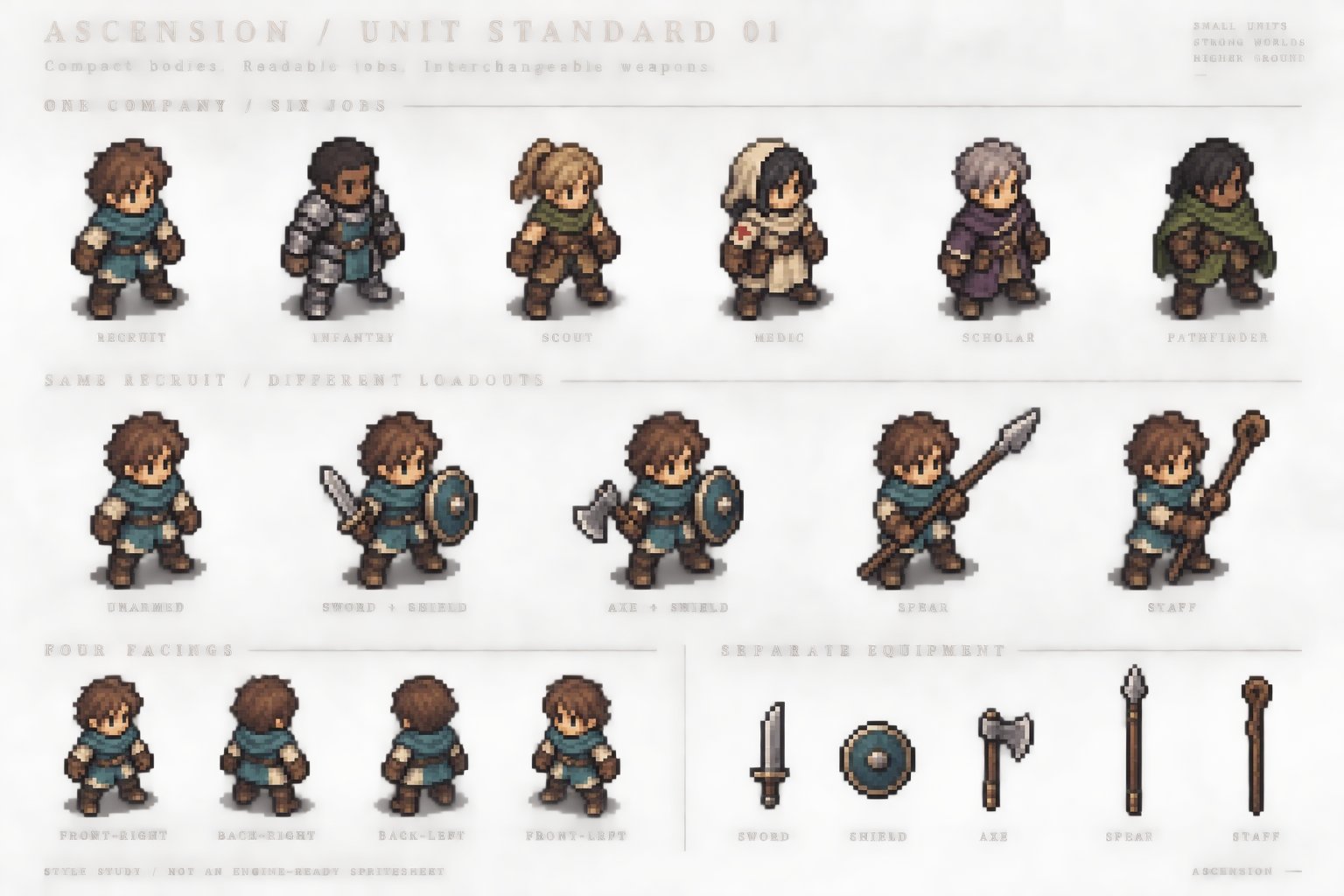
Open the original roster sheet. This generated board communicates the intended appearance. Its repeated bodies are not pixel-identical, the hand grips require cleanup, and its enlarged pixel treatment is not proof of a true low-resolution grid. Do not slice this illustration into a shipping atlas.
The six outfits share a head scale, compact adult proportions, viewing angle, ground line and shading language. Class identity comes from the tunic, armor, hood, satchel and silhouette. A sword is equipment; it is not a permanent part of an infantry character's body. Changing the weapon should not redesign the face, costume, hair or age.
Working art specification
These numbers define our proposed pilot, not the source games' sprite dimensions.
| Element | Pilot standard |
|---|---|
| Body frame | 64 × 64 transparent pixels, including empty margins |
| Typical standing human | Target 42 pixels tall; ordinary adult range 40–44 pixels, excluding tall headwear |
| Proportions | Approximately 2.7–3 heads tall; enlarged head, compact torso, short sturdy legs and readable hands |
| Foot anchor | Fixed ground pivot at (32, 56) in the 64 × 64 body cell; motion may intentionally lift feet above it |
| Directions | Four separately checked diagonal views; no automatic mirroring of equipment, insignia or asymmetrical clothing |
| Palette | Shared material ramps; starting budget 24–32 opaque colors per unit, excluding effects |
| Edges | Deliberate pixel clusters, selective dark outlines, no soft alpha fringe or painted ground shadow |
| Shading | Two or three main tones per material; broad light from above, no strongly baked sunset lighting |
| Camera | Orthographic, initially 45° yaw and 30° elevation for an approximately 2:1 ground diamond |
| Reference scene | 640 × 360 world render; at the default camera distance one cell projects to about 40 × 20 pixels |
| Display | Nearest texture filtering, test integer upscale first; high-resolution interface remains separate |
A 42-pixel-tall body over a 40-pixel-wide cell is an intentional initial scale relationship. It must be checked for overlap on back rows. Weapon reach can cross tile edges visually without changing movement occupancy. Long spears use a larger equipment canvas with the same registered origin; never shrink the character or crop the weapon merely to fit the body cell.
Do not force every person into identical anatomy. Begin with one medium body family and prove its animations, then add a second family with compatible height and head scale. Faces, skin, hair, posture and outfits distinguish people within the same art grammar. Named characters receive distinctive costume landmarks while keeping the common rendering rules.
Class, person and equipment
Represent these as independent choices:
- Person: face, skin ramp, hair and body family.
- Job: coordinated outfit, silhouette details and permitted equipment families.
- Equipment: visible main-hand weapon and off-hand item.
- Company: restrained cloth accents plus a UI marker; color alone does not communicate allegiance.
For the first playable, a job changes a complete coordinated outfit. Do not promise a separate visible replacement for every glove, belt and boot. That extra costume layering multiplies seams and cleanup before it adds much battlefield value. Weapon interchangeability is the priority.
How interchangeable weapons actually work
Build the art from body animation + registered equipment frames + masks or front/back layers. Export aligned frame assets or precompose and cache loadout frames; either approach preserves independent weapon source art. The implementation choice should follow a small Godot prototype, not an assumption that one attachment node solves every pose.
Each body frame records its ground pivot, right-hand grip, optional left-hand grip, weapon orientation, and which parts of the weapon belong behind or in front of the body. A spear shaft can pass behind the torso while a hand appears over it. Drawing the entire weapon permanently above the body will look wrong.
Equipment art needs authored orientation and foreshortening. Merely rotating one pixel sword through arbitrary angles can introduce uneven pixels and unreadable shapes. Use discrete checked weapon poses, with effects rendered separately. Reuse motion within compatible size and grip families.
| Weapon family | Required body motion | Reuse boundary |
|---|---|---|
| One-handed blade | Ready, slash, recovery | Similar short swords can share it; oversized blades cannot automatically do so |
| One-handed axe or mace | Heavier swing and recovery | Shares some locomotion with the sword; attack timing and silhouette need checking |
| Two-handed polearm | Two-hand ready, thrust and recovery | Spear variants share grips if shaft length and hand spacing are compatible |
| Staff | Carry, plant/raise, cast | Can reuse selected locomotion; casting is not a spear thrust |
| Bow | Draw, hold, release | Needs two-hand contact and checked bow/string states; add after the melee pilot |
| Shield | Carry, guard, block | May need a different arm pose; must preserve the chosen hand in every view |
The desired promise is a recruit can equip several compatible weapons without becoming a new character. It is not that every character can use every weapon with one universal animation. Gameplay may still restrict weapon families by job.
Maps that support these units
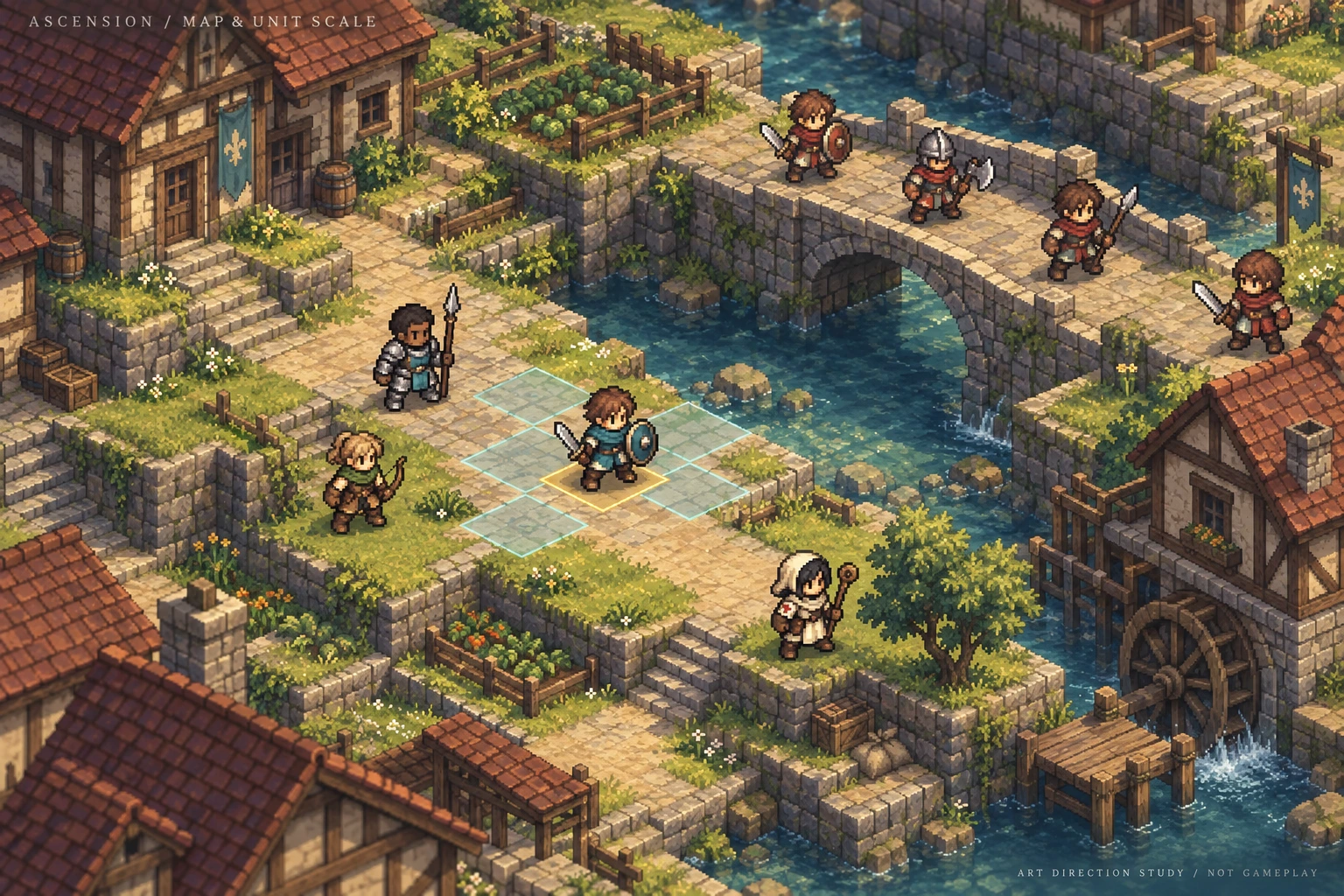
Open the original map study. This is a generated composition and readability study, not a captured engine scene or measurement of sprite scale.
Use simple 3D terrain with authored pixel textures, terraces, retaining walls, bridges, roofs and stairs. Give wood, stone, water and grass distinct value and texture groups. Concentrate small details near edges and landmarks; preserve quiet ground under units. The selected and adjacent tactical cells must stay legible in shade as well as sunlight.
Adopt richer lighting, water and environmental depth without blurring the active battlefield. Disable depth-of-field over playable surfaces. Keep bloom restrained and keep characters readable under the darkest allowed scene lighting. Sprite material lighting, contact shadows and terrain shadows need a measured engine test; the concept's painted light cannot validate that integration.
Start with one fixed camera. If quarter-turn camera rotation is added, derive the displayed sprite direction from both the unit's world facing and the camera orientation. The logical facing used for combat must not change when the camera rotates. Bridges and upper floors require explicit tactical surfaces and depth tests, not just a visually attractive mesh.
The smallest useful production proof
- Clean one unarmed generic recruit into an actual 64 × 64 transparent master. Check the 42-pixel target, palette and foot pivot at native size and 3× zoom.
- Author four views. Lock handedness, outfit landmarks and body dimensions before adding jobs.
- Make one walking cycle per view and reuse it for idle-in-place and traversal. The pilot uses sixteen source frames per direction; select and clean the production cadence before multiplying it across the roster.
- Make one six-frame sword attack and one six-frame spear thrust in each view: 48 additional body frame instances before alternate ready poses, shield poses, damage or casting. Equipment frames and masks are additional work.
- Show that same recruit switching between two sword designs and two spear designs. Check grips on every attack frame, not just the idle image.
- Place six to eight copies on the village test map, including rear rows and shadow. Verify walk anchors, depth overlap, outline contrast, attack contact and actual on-screen size.
- Only then extend to armored infantry and medic outfits, followed by more body families and jobs.
AutoSprite can be tried for motion candidates from the cleaned, unarmed master. Ask for one weapon-family motion at a time and inspect the exports. Do not use a new unconstrained character-generation prompt for each loadout. Regardless of the tool, body registration, pixel cleanup, equipment layers and final acceptance belong to our own asset pipeline.
Acceptance means: no unintended ground drift, no switched handedness, no weapon fused into the body texture, stable face and costume, no clipped spear tips, readable units on grass/stone/snow/shadow, and correct equipment overlap throughout the attack. Grounded contact frames should remain fixed; intentional bobbing and jumps are not errors. Export metadata must retain frame durations, grip points, layer order and hit-event timing.
What this resolves, and what still needs approval
The creator's chosen direction is now clear: FFT-led units, richer isometric maps, generic job presentation and modular weapons. This document narrows the previous broad art exploration accordingly. The candidate sheet's exact appearance is still for review. Production begins with the cleaned recruit and weapon-switching test, rather than treating a good-looking generated board as a finished asset standard.
References and generation record
- Square Enix — Final Fantasy Tactics: The Ivalice Chronicles: official visual and job-system reference.
- Nintendo — Triangle Strategy: official HD-2D presentation reference.
- Nintendo — Triangle Strategy tactical tips: battlefield reference for terrain readability.
The dimensions and implementation rules above are original project proposals. The two new studies were made with the built-in image-generation tool. The complete prompts are saved alongside the local art-direction source as prompts.json.Current creator-confirmed presentation: Play The Old Road and read Cinematic combat and the first playable. Compact map sprites transition into larger side-view fighting-game-style sprites. The map idle plays the walking cycle in place. Combat scenes are entirely automatic: no timed inputs, combos or defensive-response menu.
Street Fighter and Guilty Gear guide the cinematic pose language and impact. FFT continues to guide compact map readability, and Triangle Strategy guides the eventual environmental richness. Character identity and equipment must match across both scales. The previous low-poly fighter experiments and Whitebridge defensive-response mockups are superseded; Whitebridge iteration 02 remains an archived concept study.
The playable uses actual AutoSprite sheets for two generic units: eight directional 16-frame map walks at 192-pixel source cells, and 384-pixel source cells for cinematic ready, attack and hit. The walking clip serves both movement and map idle. Atlas metadata provides fixed clip anchors, timing and selected frames. These generated assets still need production cleanup, especially weapon continuity and anatomical consistency; they do not prove the 64-pixel palette and modular equipment targets below.
Weapons are baked into the pilot frames. The independent body/equipment architecture below remains a future asset-production goal. Earlier melee and movement previews are archived experiments and do not override the new idle or combat decisions.
Candidate roster
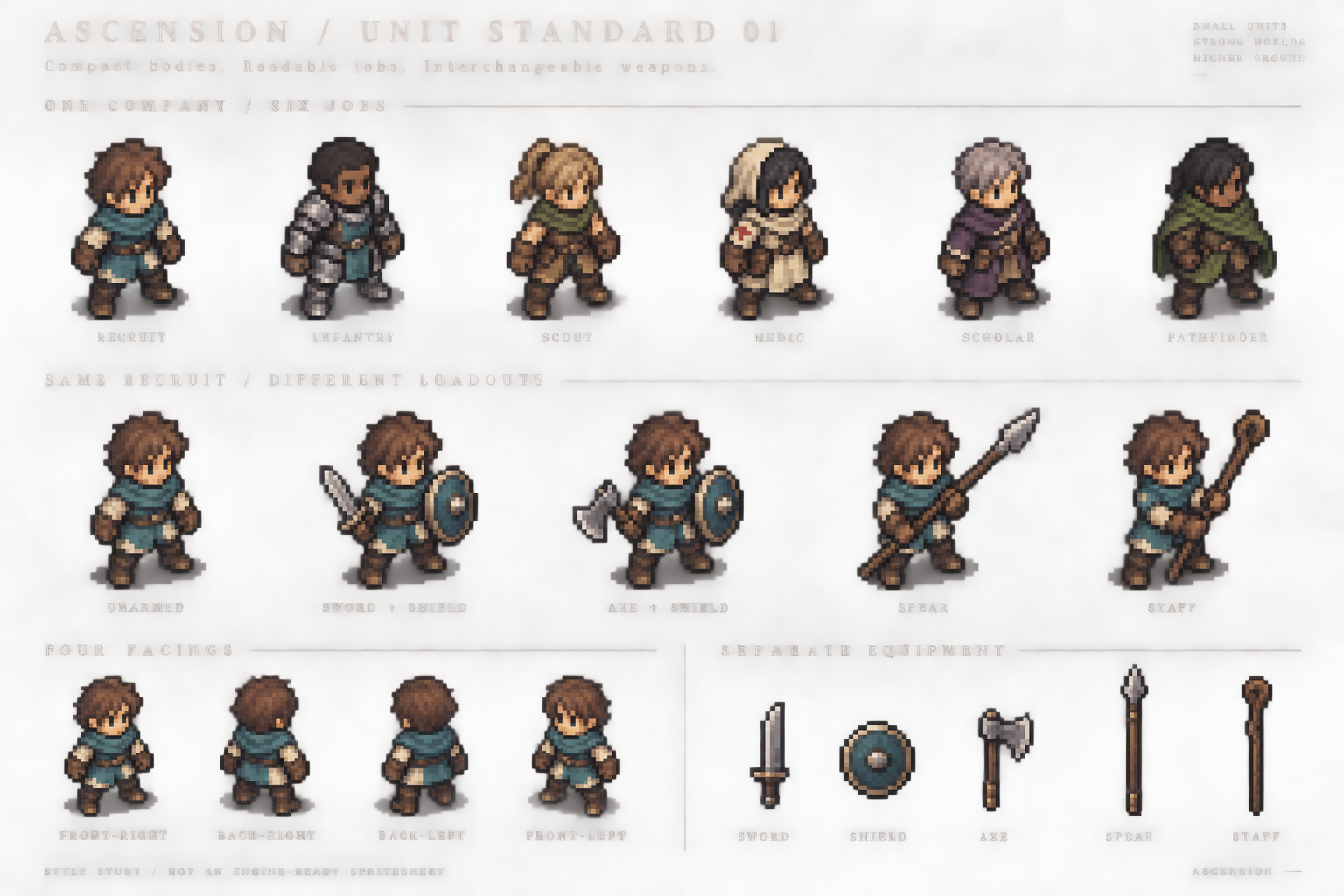
Open the original roster sheet. This generated board communicates the intended appearance. Its repeated bodies are not pixel-identical, the hand grips require cleanup, and its enlarged pixel treatment is not proof of a true low-resolution grid. Do not slice this illustration into a shipping atlas.
The six outfits share a head scale, compact adult proportions, viewing angle, ground line and shading language. Class identity comes from the tunic, armor, hood, satchel and silhouette. A sword is equipment; it is not a permanent part of an infantry character's body. Changing the weapon should not redesign the face, costume, hair or age.
Working art specification
These numbers define our proposed pilot, not the source games' sprite dimensions.
| Element | Pilot standard |
|---|---|
| Body frame | 64 × 64 transparent pixels, including empty margins |
| Typical standing human | Target 42 pixels tall; ordinary adult range 40–44 pixels, excluding tall headwear |
| Proportions | Approximately 2.7–3 heads tall; enlarged head, compact torso, short sturdy legs and readable hands |
| Foot anchor | Fixed ground pivot at (32, 56) in the 64 × 64 body cell; motion may intentionally lift feet above it |
| Directions | Four separately checked diagonal views; no automatic mirroring of equipment, insignia or asymmetrical clothing |
| Palette | Shared material ramps; starting budget 24–32 opaque colors per unit, excluding effects |
| Edges | Deliberate pixel clusters, selective dark outlines, no soft alpha fringe or painted ground shadow |
| Shading | Two or three main tones per material; broad light from above, no strongly baked sunset lighting |
| Camera | Orthographic, initially 45° yaw and 30° elevation for an approximately 2:1 ground diamond |
| Reference scene | 640 × 360 world render; at the default camera distance one cell projects to about 40 × 20 pixels |
| Display | Nearest texture filtering, test integer upscale first; high-resolution interface remains separate |
A 42-pixel-tall body over a 40-pixel-wide cell is an intentional initial scale relationship. It must be checked for overlap on back rows. Weapon reach can cross tile edges visually without changing movement occupancy. Long spears use a larger equipment canvas with the same registered origin; never shrink the character or crop the weapon merely to fit the body cell.
Do not force every person into identical anatomy. Begin with one medium body family and prove its animations, then add a second family with compatible height and head scale. Faces, skin, hair, posture and outfits distinguish people within the same art grammar. Named characters receive distinctive costume landmarks while keeping the common rendering rules.
Class, person and equipment
Represent these as independent choices:
- Person: face, skin ramp, hair and body family.
- Job: coordinated outfit, silhouette details and permitted equipment families.
- Equipment: visible main-hand weapon and off-hand item.
- Company: restrained cloth accents plus a UI marker; color alone does not communicate allegiance.
For the first playable, a job changes a complete coordinated outfit. Do not promise a separate visible replacement for every glove, belt and boot. That extra costume layering multiplies seams and cleanup before it adds much battlefield value. Weapon interchangeability is the priority.
How interchangeable weapons actually work
Build the art from body animation + registered equipment frames + masks or front/back layers. Export aligned frame assets or precompose and cache loadout frames; either approach preserves independent weapon source art. The implementation choice should follow a small Godot prototype, not an assumption that one attachment node solves every pose.
Each body frame records its ground pivot, right-hand grip, optional left-hand grip, weapon orientation, and which parts of the weapon belong behind or in front of the body. A spear shaft can pass behind the torso while a hand appears over it. Drawing the entire weapon permanently above the body will look wrong.
Equipment art needs authored orientation and foreshortening. Merely rotating one pixel sword through arbitrary angles can introduce uneven pixels and unreadable shapes. Use discrete checked weapon poses, with effects rendered separately. Reuse motion within compatible size and grip families.
| Weapon family | Required body motion | Reuse boundary |
|---|---|---|
| One-handed blade | Ready, slash, recovery | Similar short swords can share it; oversized blades cannot automatically do so |
| One-handed axe or mace | Heavier swing and recovery | Shares some locomotion with the sword; attack timing and silhouette need checking |
| Two-handed polearm | Two-hand ready, thrust and recovery | Spear variants share grips if shaft length and hand spacing are compatible |
| Staff | Carry, plant/raise, cast | Can reuse selected locomotion; casting is not a spear thrust |
| Bow | Draw, hold, release | Needs two-hand contact and checked bow/string states; add after the melee pilot |
| Shield | Carry, guard, block | May need a different arm pose; must preserve the chosen hand in every view |
The desired promise is a recruit can equip several compatible weapons without becoming a new character. It is not that every character can use every weapon with one universal animation. Gameplay may still restrict weapon families by job.
Maps that support these units
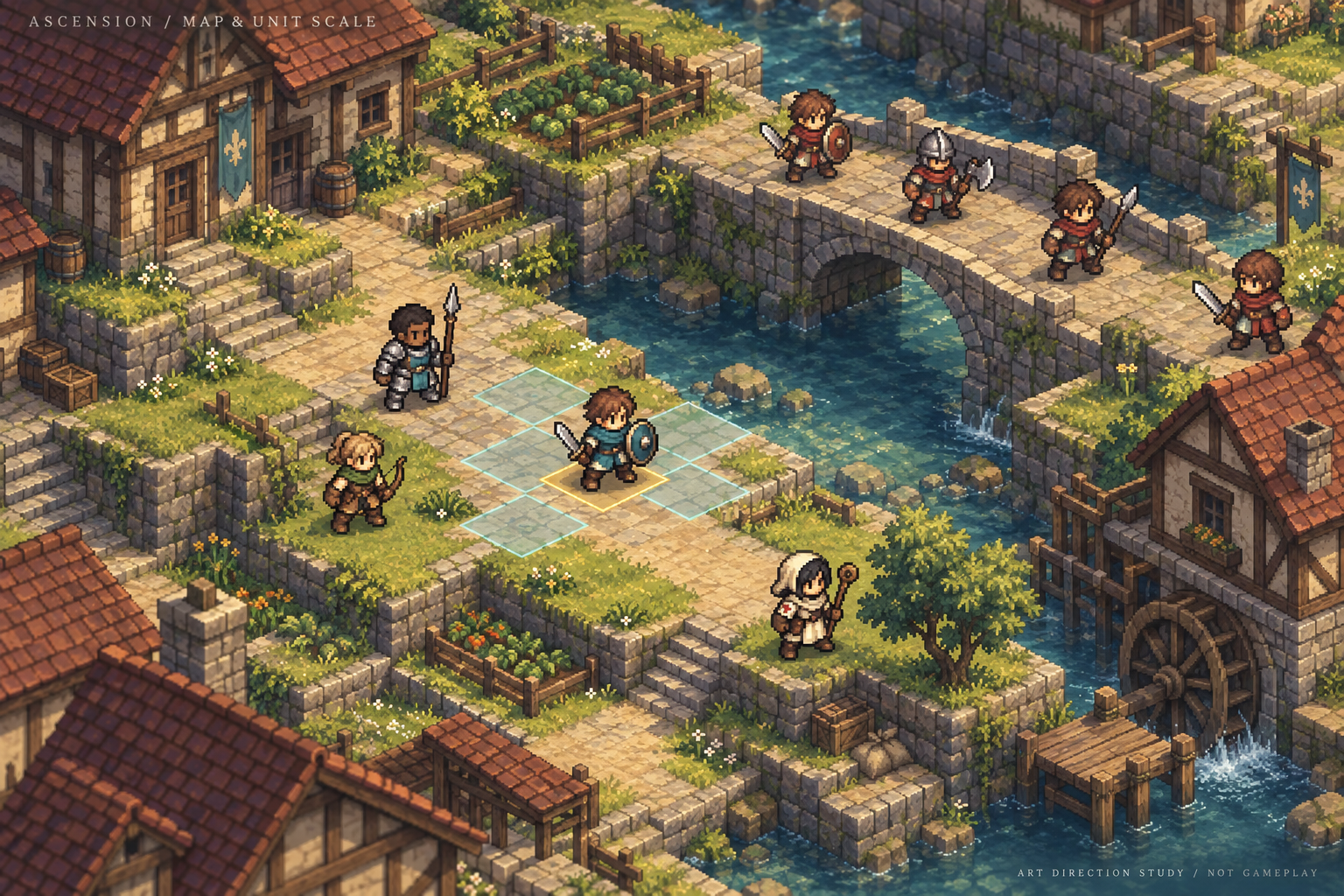
Open the original map study. This is a generated composition and readability study, not a captured engine scene or measurement of sprite scale.
Use simple 3D terrain with authored pixel textures, terraces, retaining walls, bridges, roofs and stairs. Give wood, stone, water and grass distinct value and texture groups. Concentrate small details near edges and landmarks; preserve quiet ground under units. The selected and adjacent tactical cells must stay legible in shade as well as sunlight.
Adopt richer lighting, water and environmental depth without blurring the active battlefield. Disable depth-of-field over playable surfaces. Keep bloom restrained and keep characters readable under the darkest allowed scene lighting. Sprite material lighting, contact shadows and terrain shadows need a measured engine test; the concept's painted light cannot validate that integration.
Start with one fixed camera. If quarter-turn camera rotation is added, derive the displayed sprite direction from both the unit's world facing and the camera orientation. The logical facing used for combat must not change when the camera rotates. Bridges and upper floors require explicit tactical surfaces and depth tests, not just a visually attractive mesh.
The smallest useful production proof
- Clean one unarmed generic recruit into an actual 64 × 64 transparent master. Check the 42-pixel target, palette and foot pivot at native size and 3× zoom.
- Author four views. Lock handedness, outfit landmarks and body dimensions before adding jobs.
- Make four-frame idle and six-frame walk cycles in each view: 40 body frame instances for the baseline locomotion set.
- Make one six-frame sword attack and one six-frame spear thrust in each view: 48 additional body frame instances before alternate ready poses, shield poses, damage or casting. Equipment frames and masks are additional work.
- Show that same recruit switching between two sword designs and two spear designs. Check grips on every attack frame, not just the idle image.
- Place six to eight copies on the village test map, including rear rows and shadow. Verify walk anchors, depth overlap, outline contrast, attack contact and actual on-screen size.
- Only then extend to armored infantry and medic outfits, followed by more body families and jobs.
AutoSprite can be tried for motion candidates from the cleaned, unarmed master. Ask for one weapon-family motion at a time and inspect the exports. Do not use a new unconstrained character-generation prompt for each loadout. Regardless of the tool, body registration, pixel cleanup, equipment layers and final acceptance belong to our own asset pipeline.
Acceptance means: no unintended ground drift, no switched handedness, no weapon fused into the body texture, stable face and costume, no clipped spear tips, readable units on grass/stone/snow/shadow, and correct equipment overlap throughout the attack. Grounded contact frames should remain fixed; intentional bobbing and jumps are not errors. Export metadata must retain frame durations, grip points, layer order and hit-event timing.
What this resolves, and what still needs approval
The creator's chosen direction is now clear: FFT-led units, richer isometric maps, generic job presentation and modular weapons. This document narrows the previous broad art exploration accordingly. The candidate sheet's exact appearance is still for review. Production begins with the cleaned recruit and weapon-switching test, rather than treating a good-looking generated board as a finished asset standard.
References and generation record
- Square Enix — Final Fantasy Tactics: The Ivalice Chronicles: official visual and job-system reference.
- Nintendo — Triangle Strategy: official HD-2D presentation reference.
- Nintendo — Triangle Strategy tactical tips: battlefield reference for terrain readability.
The dimensions and implementation rules above are original project proposals. The two new studies were made with the built-in image-generation tool. The complete prompts are saved alongside the local art-direction source as prompts.json.
Source document: 08-sprite-standard.md